Sunday, June 21, 2015

Lane guides


Line guides do move the ball in a certain position. Normally they are used to make multiple lanes, with ball switches between them. Normally they have light below them.

For example, you can see some here in a firepower playfield:

image

They come is different sizes. They come in both double sided or single sided guides.


This is a 40mm short double sided lane guide.

laneguide

A single sided lane guide with pins.

laneguide_front

ball side


laneguide_back

rear side.

A re-enforcement rib was added to absorb pinball collisions better. The sides acing the pins are angled in two dimensions to allow the rubber to pass.

tn_IMAG1918

tn_IMAG1865


I also experimented with other shapes, like this pyramid.  Does not fit a firepower Scifi pin to well.

tn_IMAG1881

Still it is an interesting shape, and will use it in the future. Still needs a bit of tuning by making the center parts a bit larger.

Rubber band switches


These switches are like the targets used to score points. Any rubber between 2 pins can be used for this switch.

You can see one on the right side, between the red pins and behind the dodgy rubber band.

image_thumb[2]


This switch is a variant of the target switch and the below playfield part is the same.

rubberswitch1_thumb

It uses a longer metal spring compared to the target. The blue part is the rubber band. Grey is the spring steel lever.


rubberswitch2_thumb

View from the other side.

tn_IMAG1868_thumb[1]

Switch mounted on a test board. The metal tab is made of spring steel. It is inserted in the plastic pivot part.

tn_IMAG1869_thumb[1]

View from the bottom

Saturday, June 20, 2015

Pins


What is a pinball without its pins!  Pins are also called posts.

Pins are available in all kinds of shapes and colours:

tn_03-8319-10 tn_140329_posts1 tn_douple ster post
tn_postsmalteal tn_pins tn_321152-i

I could have just bought them, but it is nicer to design your own ones! Also then I can change them so I could use standard M4 size screws instead of the special screws a standard pinball uses.

A typical pin is 27mm high. Combined with the special pin screw it makes a total height of 29mm. This is then the height the playfield plastics are normally mounted.

There are 2 ways a pin is used:

- the pin is used to mount the playfield plastics on

- the pin is only used to hold rubbers, and does not support the plastics. For the non supporting one, the head of the screw is below the plastic.

Because I plan to use normal M4 screw, the height of the pins has to change a bit. The head thickness of a m4 screw and washer is 3.5mm , rounded to 4mm. I wanted the plastic and playfield side rail to be both on 30mm height. This allows gates to be mounted on both without height differences. I also like to use a nice chromed acorn nut on top of the plastic, instead of these ugly locknuts I see everywhere. So the M4 screw head must be below the playfield. The nut to hold the pin in place is integrated into the pin using a melt nut. Possibly I need to use a tread glue to lock the acorn in place, but that I will try out later.

tn_IMAG1895

Acorn nuts.

So I make 2 size pins:

- a 30mm high pin with build in m4 melt nut

- a 26mm height for hidden pins, without melt nut. These have the screw head on top, and a nut below the playfield.

Ok, what shape shall the pin have? I didn’t know (and still not decided which one) so ended up designing all kinds of shapes.

image

I have faceted pin, pins with vertical ,angled and horizontal ribs and smooth pin. All in 2 different sizes. You can see the slightly larger hole needed for the m4 melt nut in the taller pins.

To allow these pins to be printed without support, the shape of the rubber groove is important to avoid the use of overhangs of more as 45 degree.

Here some examples:

tn_IMAG1729

I have printed them in transparent ABS. But I don’t think that is the best choice. You are distracted from the shape by the internal patterns created by the 3d printing process.

So at least they need to be coloured transparent to make the shape better visible. But likely it needs to made from a opaque, coloured plastic.

tn_IMAG1731

Here you can  see more shapes printed compared to a factory pin. This is the only factory pin that I have!

tn_IMAG1806

In this picture can you see how the shiny acorn nuts sits on top of a line guide. The lane guides will be discussed in a later blog.

tn_IMAG1732

Here an example of a hidden screw and acorn nut version of the pin. The number of washers is to simulate the 2 or 3mm thickness of playfield plastics.

Reflected in the pinball you can see our garden and the grapevine growing on our deck roof here in New Zealand.

Now I need to print some coloured pins to see how they look. And then decide what to use for the firepower inspired playfield.


On certain positions you need a smaller pin. This uses as rubber a piece of latex tube. I am uncertain how strong this is, and how it would handle the abuse by the pinball.

tn_IMAG1915

The top contains like the 30mm pins an optional melt nut. This allows them to be used as playfield plastic supports. The extra nut is a playfield plastic dummy. If not covered with plastic, and a shorter screw could be used.

Targets


The blog updates are a bit slow. Too much to design...

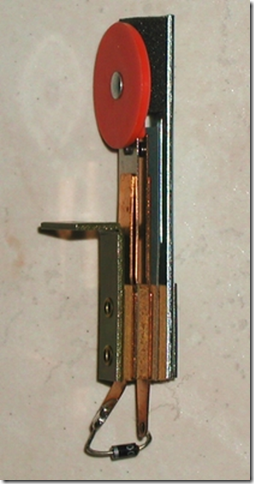
Targets are switches on a pinball playfield. They detect the ball banging into them and scoring points or special modes. Historically the targets were made with leaf switches. Typical they look like this:
image

The problem with leaf switches is that the contacts are exposed and will get dirty. They also have no defined contact pressure which is needed for a reliable contact.

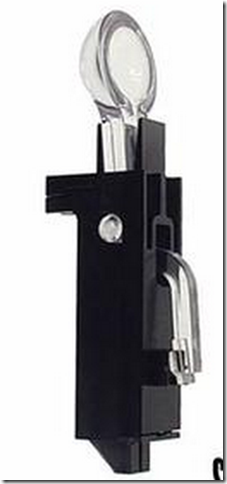
I came across this all plastic version, but this was not widely used.  I think it has a microswitch  internally.
image

Microswitches are better suited for pinball due to the closed housing and a defined minimum contact pressure for reliable contacts.

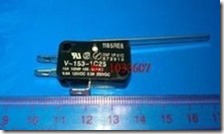
I looked around for suitable microswitches.
clip_image001

One possible type are larger microswitches with a long metal tab that sticks through the playfield. Sadly, the metal tabs from standard switches are not long enough. Also it is unknown how the long metal tabs will hold up with balls banging into them.

An better approach is to separate the microswitch and the lever functions, like they have done with the plastic targets as shown above.  For this, a small microswitch is needed.

image

These are quite small: 12 x 6 x 13mm. For my design I did not need the metal tab, and removed it.

Using the trusted OpenSCAD 3d designer I draw up the following after several iterations.

target

The target and the switch are two separate plastics.They are linked together with a piece of spring steel.  A third plastic part, not visible in this picture, holds the bottom side of the spring.  The spring steel will absorb the forces from the pinball, and return the force back to the ball.

The microswitch only needs one mm travel to make contact, so the target only needs to move a small amount.

The used spring steel is surprisingly strong and resistant to bending.

I have a variant with the screw tab on the front and on the back, depending how much space is available around the target.

target_rear

This the is the rear view. The target plastic is hollow to keep it light. In the part below the playfield is the red microswitch just visible.

The piece of plastic inside the below playfield part (shown as transparent grey below the playfield) spreads the force of the ball contact to the plastic, and will not damage or over pressure the switch. 

The switch slides in from the bottom, and can optionally be fixed into place using 2 small screws or a piece of wire. Neither is needed, because the switch is being held in place by the surrounding plastic.

To support multiple switches I also drew up a combined switch. I designed a 2,3,and 4 switch version.

The switch sets the distance between the switches, and makes the placement more simple. But  you could also just place the single switches.

target3

.My trusted Mendel90 3d printer was busy for a while printing the parts in ABS.

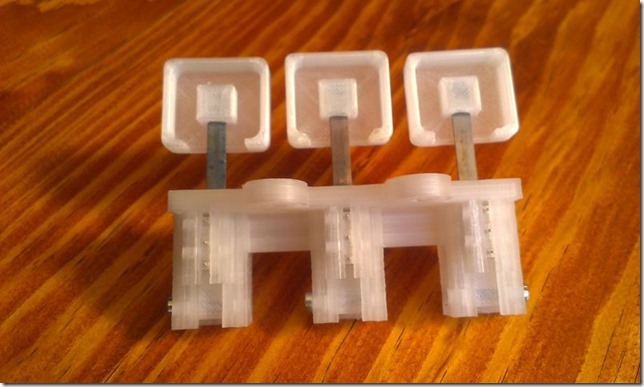
The top targets are made of transparent ABS. LEDS really nicely light them up, and I will design a led holder behind them to indicate scores in the future.

Here the single switch

tn_IMAG1870

Target switch Front

tn_IMAG1871

Target switch rear. The tab for the woodscrew does have oval holes. This allows a bit of adjustment to align the target in the playfield hole. The hole in the playfield can be small: 10mm is enough, because the target can be inserted from the top. Also a slit like normal playfield targets  use is also possible. Then you don’t have to re-assemble the target.

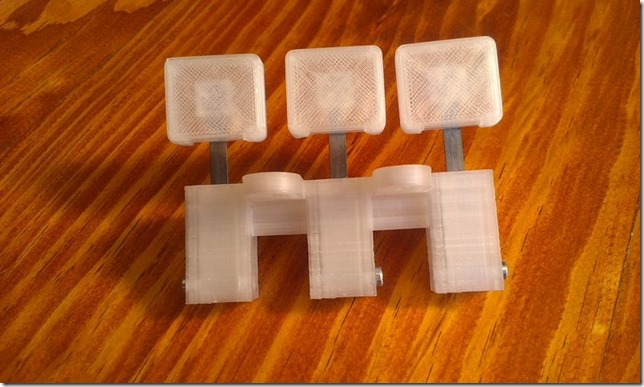
Here the  triple switch
tn_IMAG1866

Front of the triple target.

tn_IMAG1867

Here you see the back of the targets. The microswitch is just visible as 3 pins in the center. On the bottom screw that holds the target arm in place.

The spring steel is melted into the plastic for a strong connection.

To have all the targets on the same height, I made a small rig. Sadly it is not perfect, and still  I had to move the target a bit. This caused the target in the above picture to be out of alignment. Something to improve later.
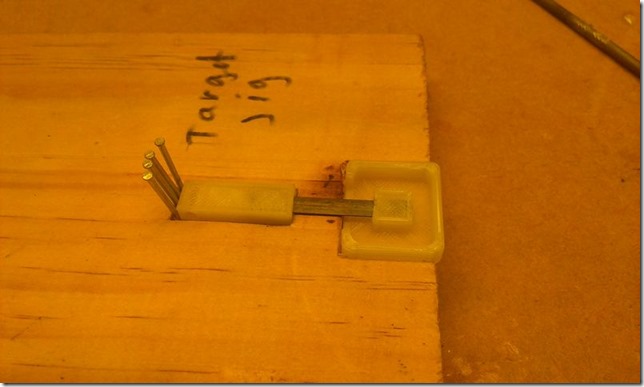
tn_IMAG1769

Here you can also see the plastic part that forms the pivot points, and what presses against the microswitch.
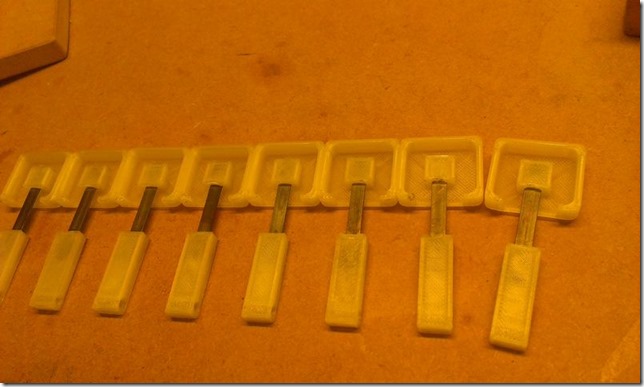
tn_IMAG1770

Just made all the targets ( except one)  for the firepower playfield. That last one is a smaller target not made yet. The fit is quite precise, and I did print them on purpose a bit oversize. After a couple of strokes on sandpaper they fit perfectly without much free play.


Till the next update!

Thursday, March 26, 2015

Nuts and 3d printed plastics


M3 and M4 screws are a very easy and strong way to connect 3d printed plastic parts that possible need to be taken apart again later. Gluing parts is another very good option, but only when you never need to take them apart any more.

The nuts can be either left on the surface of the plastic like here:

tn_nuts2tn_nuts

A bit more convenient is to embed the nuts in nut traps: either horizontal of vertical. They are then hold in place and don’t move when mounting the screws.

tn_nuttraptn_nuttrap_v

The drawbacks if the nut traps are various:

  • More work to design them.
  • Sometimes need to add extra support layers to hold the layers on top of them. Particularly is this needed when the nut trap is on the bottom of an object.
  • The horizontal ones do take away a lot of material, weakening the object. They can only be used in larger objects.
  • Need to have access to either the side or the back of the object.
  • Depending on the object the screws needed can get very long, because they have to go through part or whole of the object.

Then I came across these nuts you melt in the plastic. They solve lot of issues.

tn_IMAG1547

One is inserted into the plastic part.  They only need very little space and material, but still hold the plastic very strongly.

They come if lots of all kinds different lengths, diameter and screw sizes. The ones shown in the picture are M3 x 4mm high x 4mm diameter. They are mounted in the plastic using a soldering iron set to 250 degree for ABS.

Here is an example of use of them: hold the spring screw.

tn_nuts_melt2

Parcels


To make a pinball you need a surprising amount of things. Even when I making most parts of the pinball myself, you still needs lots of them. My desk is full of stuff.

I just got my parcel from Marco with rubbers and balls. I ordered the FirePower rubber set. Likely  most rubbers will match, but some will not because I will change some parts on the playfield.

Marco uses a strange company to handle the international orders : IGlobal. I paid 5 dollar extra for tracking. But do you think they the send me a tracking number?  Had to ask for it. First they email I didn’t pay for tracking, but then it occurred to them I had, and send me one. Still a useless tracking number: it was not tracked, even when the latest due date of the parce was just 4 days away. Suddenly it popped up:  It was only tracking the part in New Zealand ! What a waste of money for a tracking number! The only good things ware that the customer service answered very fast and the parcel did arrive.

Likely will not order much any more from the USA: the shipping cost is killing !

tn_IMAG1579

It was nice to see that the rubbers fit the flippers very well .

tn_IMAG1583


Also received where the WS2812 addressable RGB leds. These are quite nice because the vendor already soldered a 10cm lead between the Leds. So in most places this will be long enough to go from one playfield insert to the next. This will save me a huge amount of soldering.  In some places the distance will be too long, and I will need to extend the wire.

 tn_IMAG1585

With use of a little bracket (still to design) the Leds will be mounted on the bottom and top of the playfield. Still need to try them to see how bright they actually are, but that is not straight forward because these Leds need to controlled with a special digital pattern.

tn_IMAG1586

Wednesday, March 25, 2015

Eject shield


Eject shield

The eject shield is the piece of plastic that hold the ball in a ball trap. This is the red square part in the pic.

tn_5H5A6358 - crop

For the design of the ball eject assembly, I first drawn up the normal eject shield. This can then be used to as a base for my own one ball eject..

Here you can see the eject shield plastic from the top:

tn_eject_shield_angle

The problem as always that I don’t have access to one. So have to resort measuring some pictures and then hope you have the correct sizes. With these make the following design:

t_eject

The ramp is different, because the two little points in the original design are really to fragile in a 3d printed part.

Interesting is that the ball is not centered in the hole, but is offset by about 2mm. This allows the ramp to extend to the top of the 12mm playfield.

Some other views

t_eject2 t_ball
t_in_playfield  

Viewed as printed part.

tn_IMAG1574tn_IMAG1576

tn_IMAG1577

The eject shield  design is published in Thingiverse: http://www.thingiverse.com/thing:738085  . Also the pinball ball you see in the picture is found there: http://www.thingiverse.com/thing:738093